Summary
- Purchased a cheap, app-enabled spy camera from Amazon and pulled it apart.
- Found hardcoded Alibaba Cloud Object Storage Service (OSS) credentials baked into both the firmware and the Android app.
- Thousands of cameras were found to be uploading footage to the same storage bucket hosted in China, with no per-user access control.
- Dumped the firmware and found a pre-authentication debug_device command which allowed remote code execution on the device.
- Ability to view all camera footage from the app, for any device.
We often hear warnings about cheap electronics from overseas supply chains, especially IoT devices with cloud-enabled features. This project set out to test how real those warnings are, and whether insecure, mass-market IoT cameras remain a security problem in 2026.
This write-up details the journey from target identification to total compromise alongside mistakes that anyone interested in IoT testing can learn from. This research identified hardcoded Alibaba Object Storage Service (OSS) credentials in the camera’s firmware which led to the discovery that thousands of cameras share the same storage bucket with no per-user access control. Analysis of the device’s firmware revealed a debug_device command which allowed unauthenticated remote code execution on the device. Ultimately the camera and its companion mobile application were found to lack basic security features which allowed live footage to be viewed from any device of the same family.
An impulse buy
The journey started in a hotel room during an onsite job. I was watching a YouTube video of a researcher doing chip-off firmware extraction, physically desoldering a flash chip off a board and reading it with a dedicated programmer. I found this fascinating and wanted to try it myself.
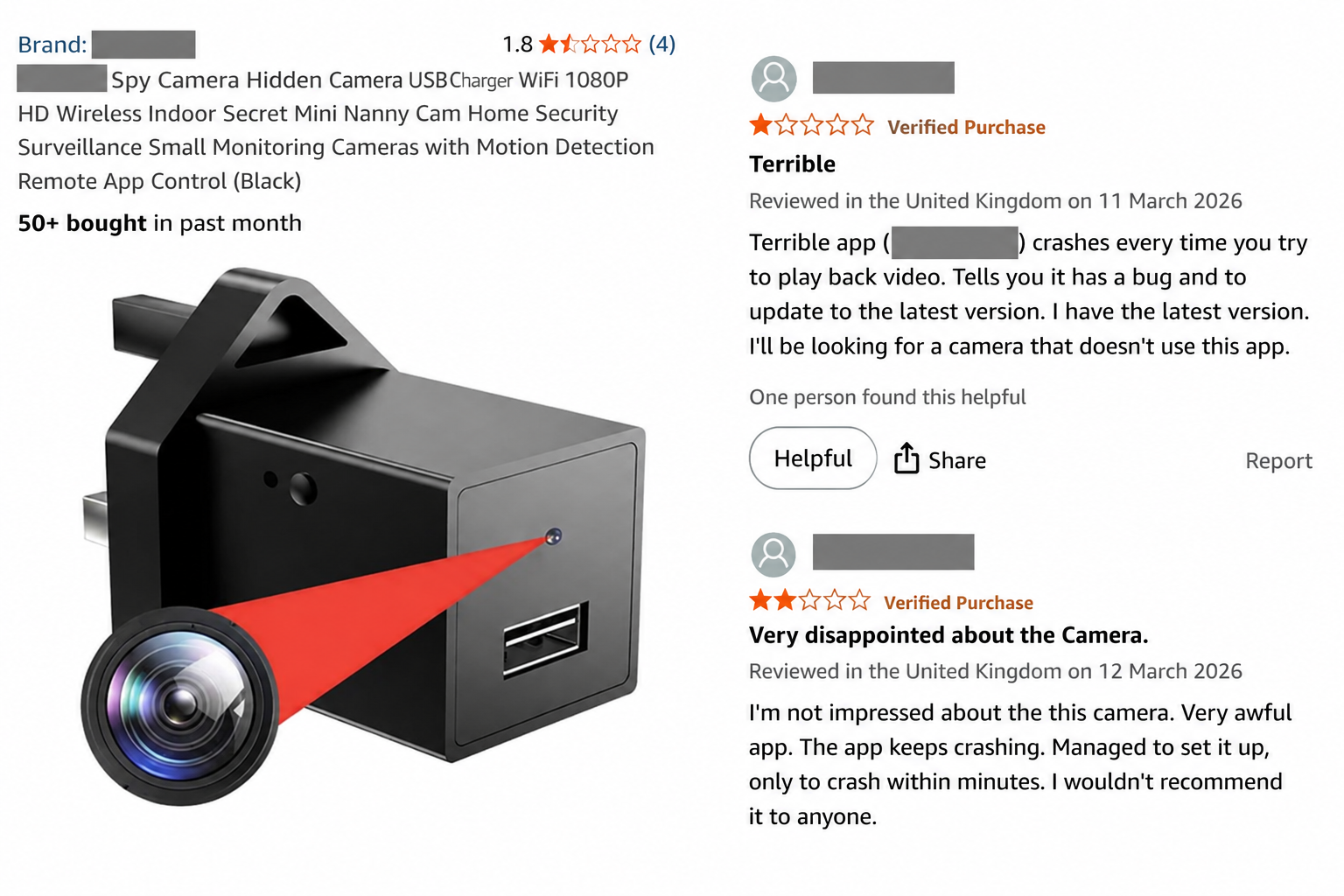
After a few evenings browsing Amazon for a target, I landed on a category I hadn't paid much attention to before: hidden spy cameras. They come in many different forms like cubes, alarm clocks, smoke detectors, USB chargers, all with a tiny camera inside. Many only record locally to an SD card, but some are Wi-Fi enabled and come with a companion app. I settled on a USB-charger camera with Wi-Fi support and a review score of 1.8 / 5.0. The worse, the better, I thought.
With the camera on its way, I had two questions I wanted to answer:
- Is this device talking to, or uploading footage to servers overseas?
- Are my recordings secure, or can you access recordings from other people's cameras? (To spy on the spy.)
A note: Everything here was carried out on a device and a network owned and controlled by the author, in an isolated lab setup. No third-party cameras were accessed beyond confirming the existence of a systemic issue.
What is this thing?
The target is an unbranded USB charger with a hidden camera inside. The Amazon storefront behind it mostly sells assorted gadgets and, oddly, jaw exercisers. The listing showed more than 50 units sold in the preceding month. One review casually named the companion app and from that single breadcrumb I found almost no prior public research on this specific camera-and-app combination. No brand, bad reviews, no existing write-ups: every signal pointed to a good target.
A day later a small, yet suspicious box arrived. There was no identifying information on it whatsoever. However, it did proudly carry an “authentic” badge and stated “stable quality” which filled me with confidence. Good luck trying to guess what’s inside.
Hardware Teardown
Before plugging anything into my network, I took the device apart. Inside were two boards: a USB power/charger board, and a separate camera board that slid out with a single ribbon connector to unplug from the front plate.
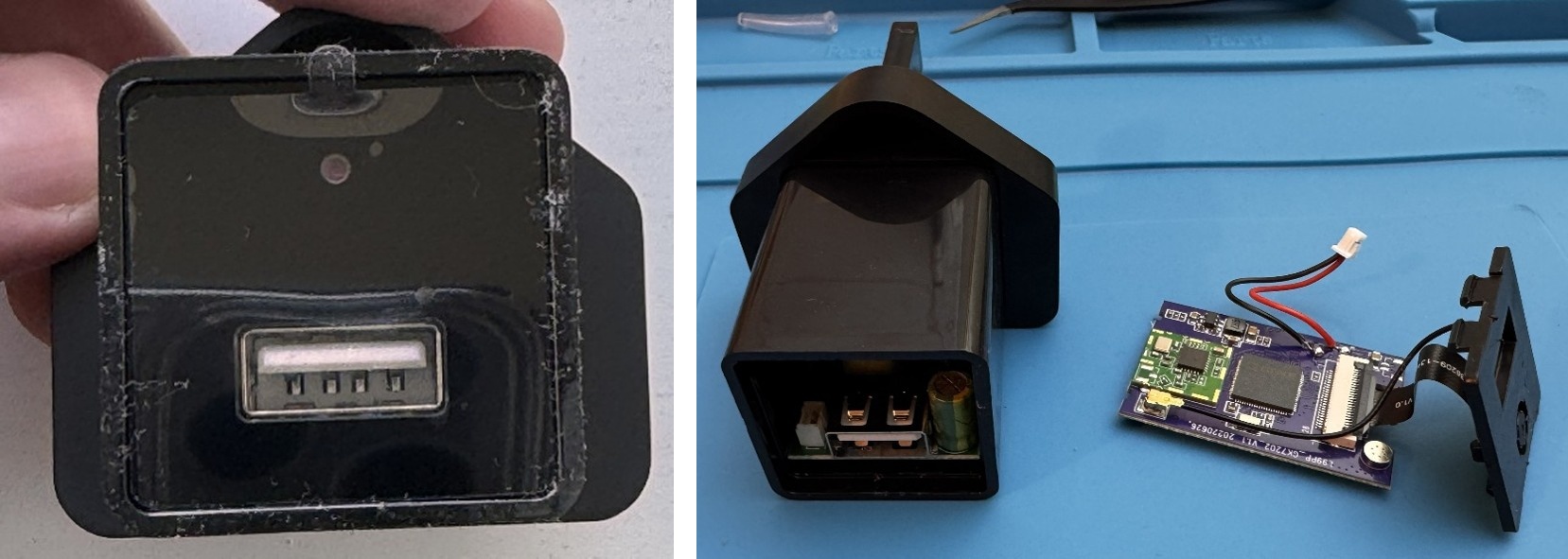
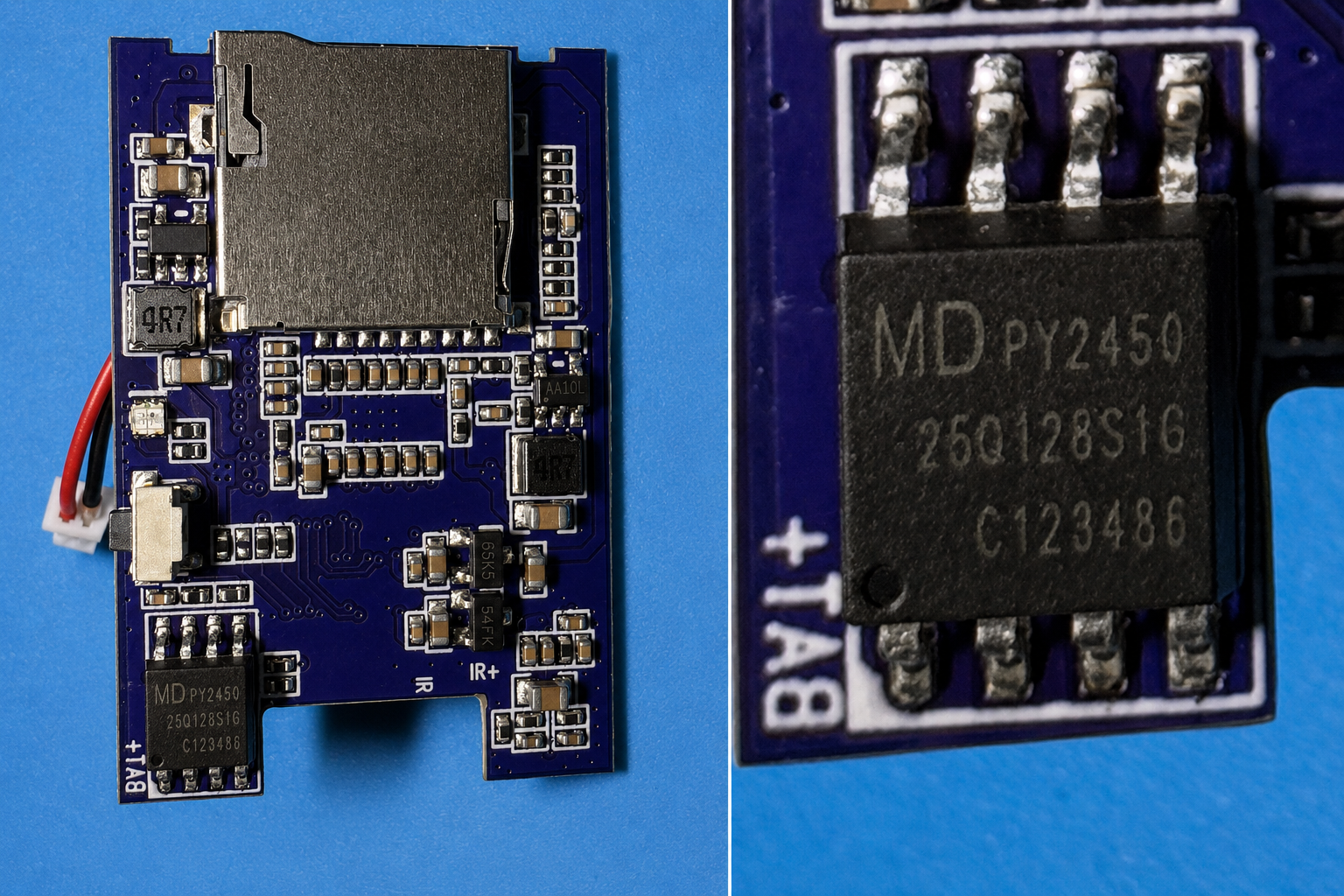
The camera board is a double-sided PCB carrying a Goke GK7202 SoC and a Wi-Fi/Bluetooth add-on module on one side, and a flash chip on the other. With no obvious UART pads visible, I went for the SPI flash directly. The chip is a Puya Semiconductor PY25Q128 NOR flash with no exact datasheet online, but the documentation I could find suggested it's a clone of the widely used Winbond W25Q family.
Starting off with a casualty
My first plan was to try and dump the firmware via a non-destructive route. To do this I tried to read the chip in place with a cheap CH341A programmer and a SOP8 test clip.
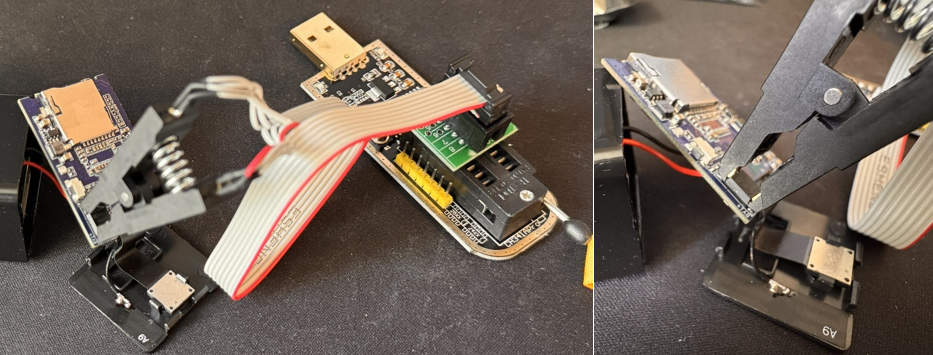
This setup refused to detect the chip. Working with half-correct documentation for the Puya flash chip and being unfamiliar with the CH341, I made a mistake. The programmer operates at 5V by default, while the Puya chip runs at 3.3V. Unsure of the correct clip orientation, I tried every combination, which meant driving 5V across the chip several times. Just like that, we had a dead chip.
Lesson. Always buy two identical research targets if your budget allows it. I ordered a second (used) camera and, while waiting, read more about the chip pin-out and prepared for a proper chip-off exercise.
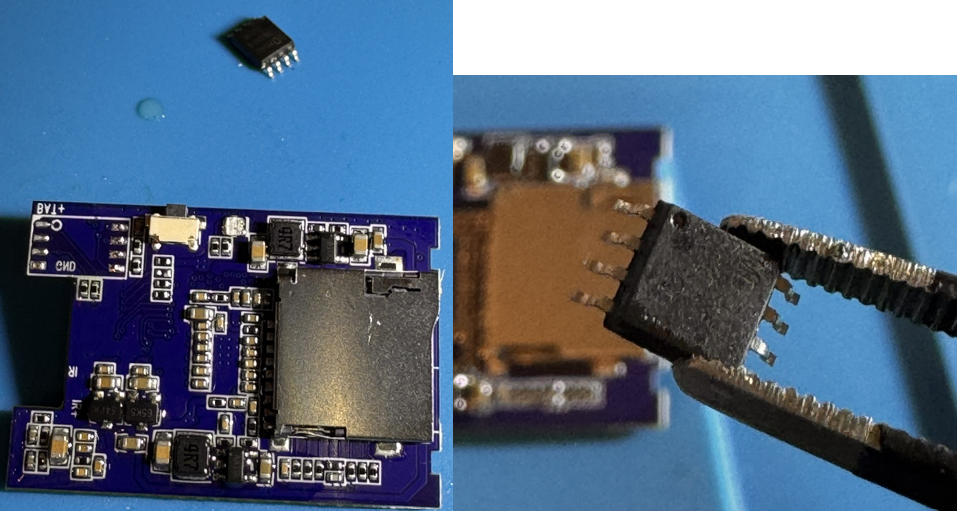
Second time around the flash was desoldered with a heat gun, flux, and a lot of patience.
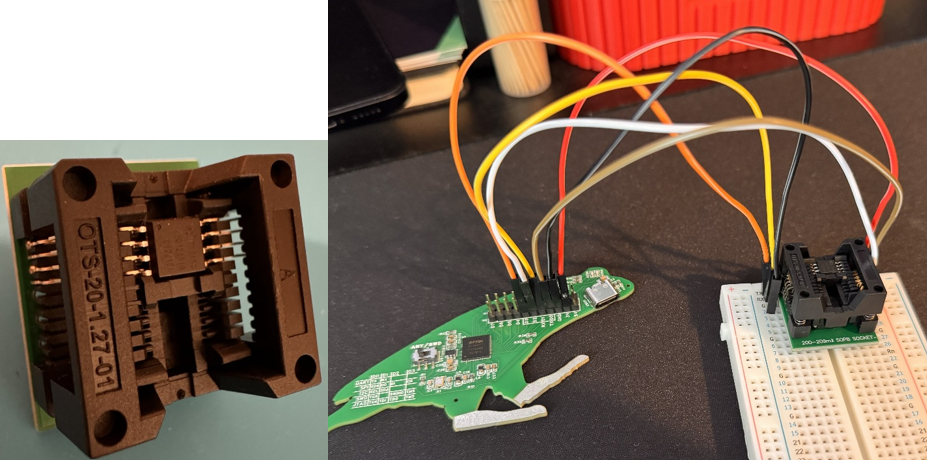
Instead of the CH341 and clip this time we used an in-house multi-protocol board, the “Frogboard”. With the Puya chip seated in a 200mil wide SOP8 adapter and the correct pin connections, flashrom finally detected it and identified the chip as a GigaDevice part.
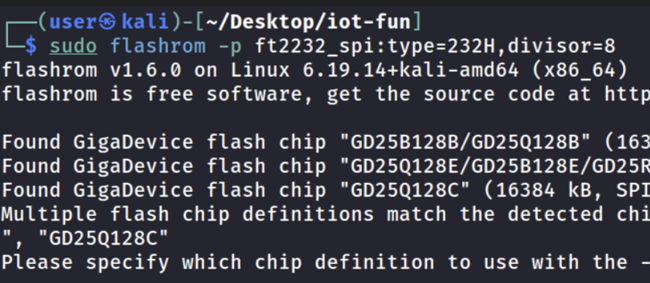
Choosing GD25Q128C, flashrom was able to dump the firmware.

Initial Firmware Analysis
A quick binwalk revealed a full Linux filesystem plus a handful of other partitions.
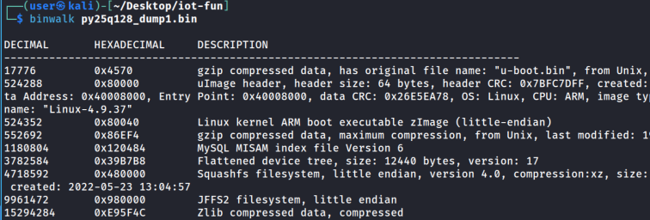
The root partition was fairly dull, though /etc/passwd contained a hardcoded root hash.
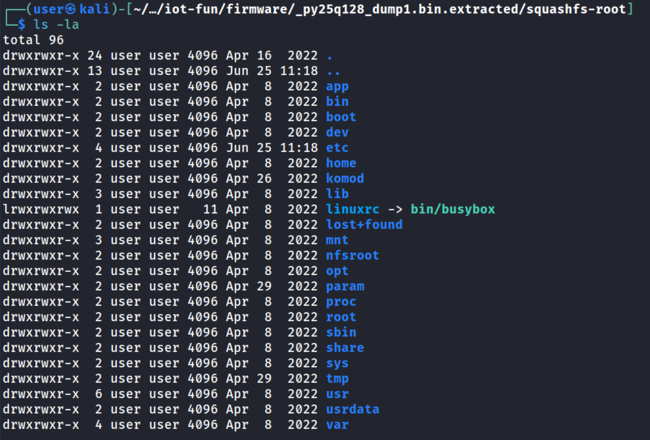

The hash cracked quickly and turned out to be a “null hash”, meaning the only user on the device, root, had no password set at all. Overall, this wasn’t a big deal for external access as the device did not have any management interfaces open like SSH or Telnet.
The /usrdata partition was where the interesting content lived: the camera's custom binaries and configuration files.
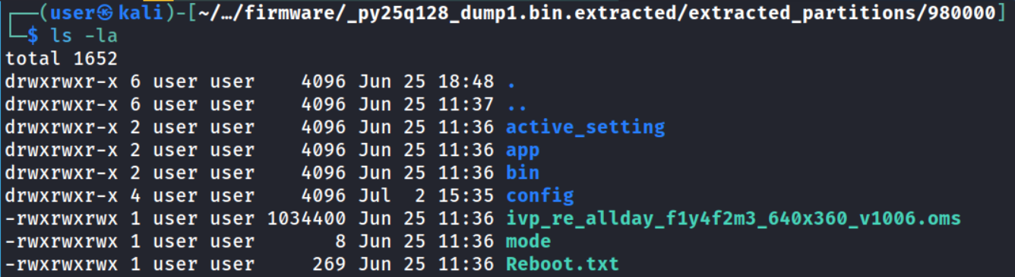
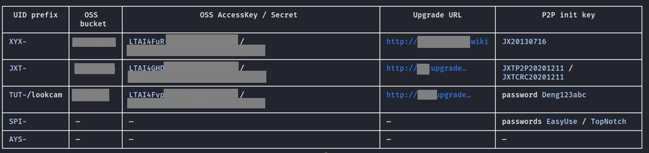
Inside were multiple sets of hardcoded credentials to Alibaba storage buckets, peer-to-peer initiation keys, a Firebase admin private key, and more.

With the firmware analysis done, the flash chip was soldered back onto the board and the camera booted up fine.
Network Traffic Analysis
With the device reassembled, we wanted to see how the device talks to the cloud and to the Android app. An isolated lab network was set up using a compact travel router with an initial temporary cellular uplink. An Android phone running the camera companion app and the camera were both connected to the router using WiFi and traffic was captured directly on the router with tcpdump.
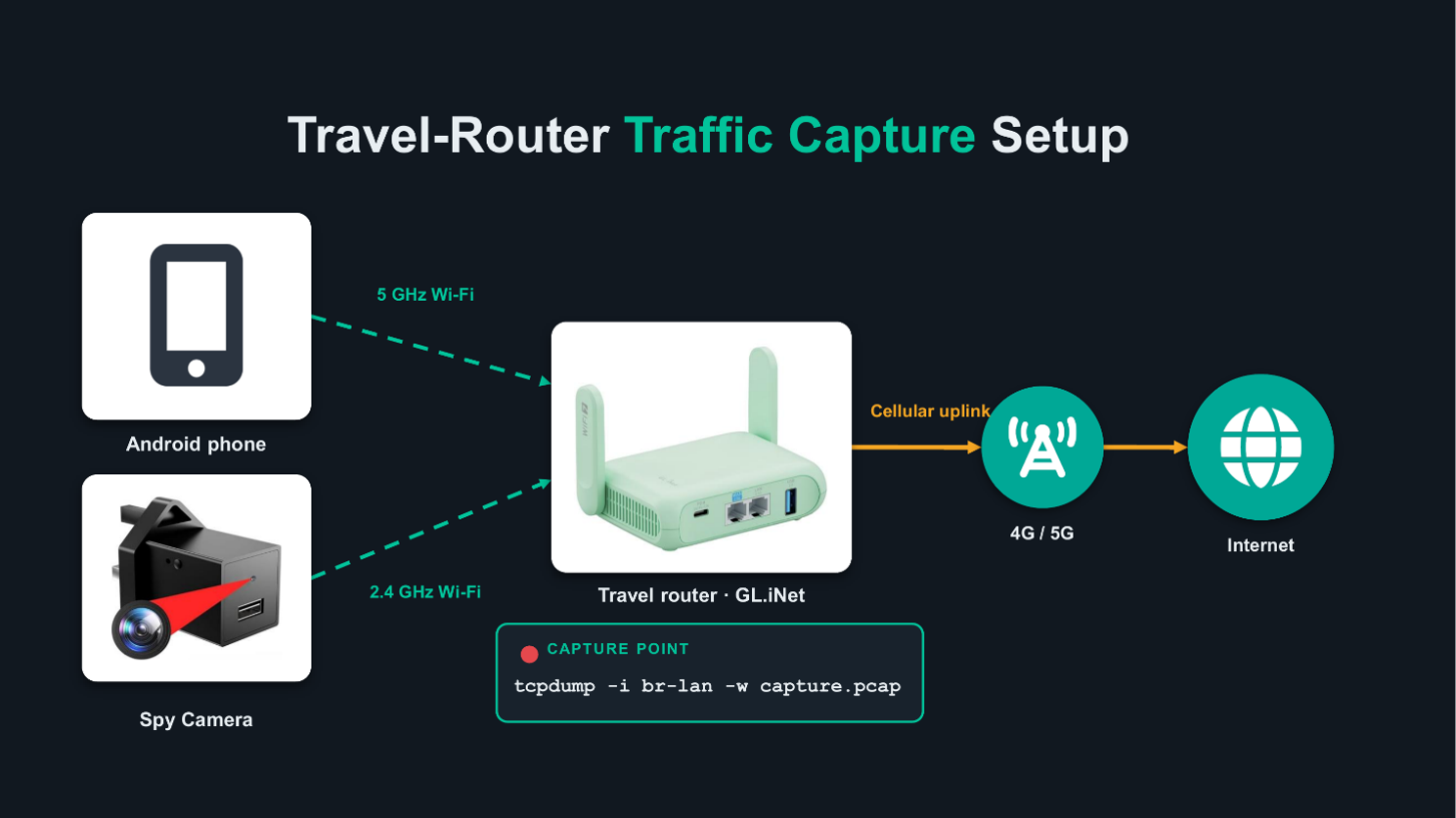
At first the capture was incomplete. There were visible connection attempts to a set of “supernodes” used for initiating the P2P link between the camera and the mobile app. The app was also seen talking to an Alibaba bucket in cleartext, but no direct app-to-camera traffic was captured.
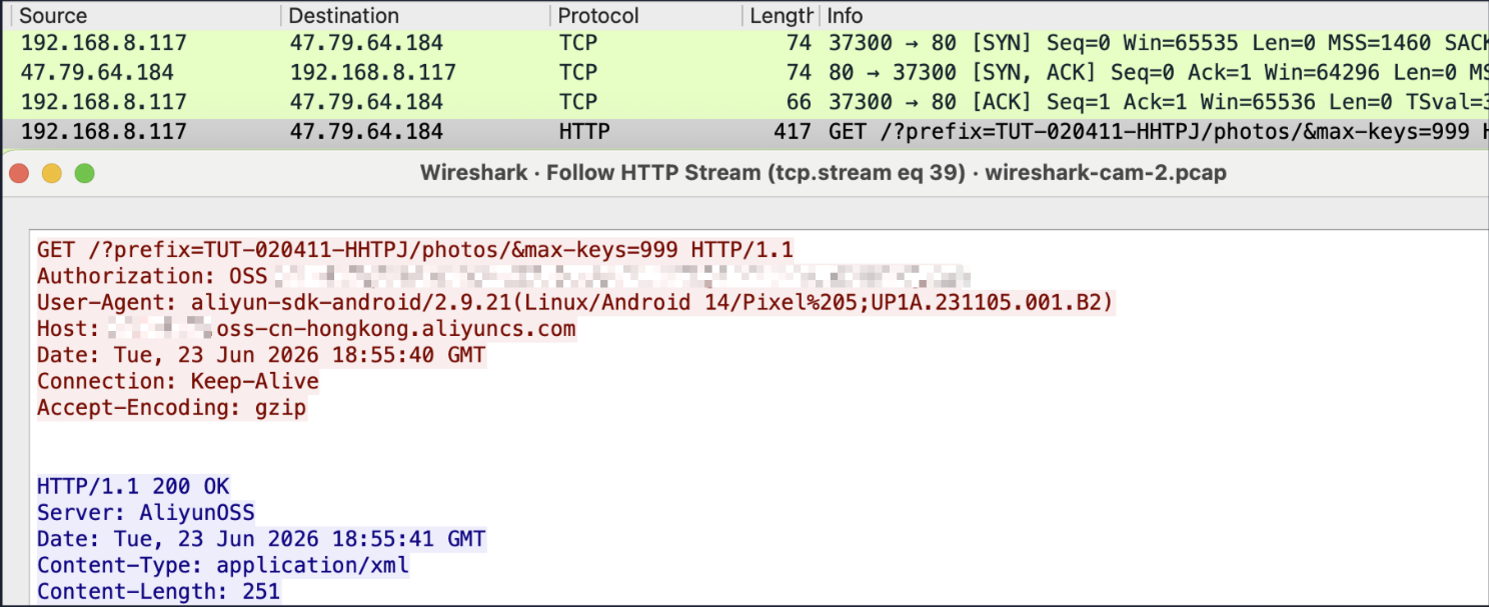
That turned out to be a quirk of the WiFi AP combined with the camera's peer-to-peer design. With both devices on the same 2.4GHz radio, their direct traffic never crossed the router's internal bridge where tcpdump was capturing. Putting the phone on the 5GHz network and leaving the camera on 2.4GHz forced all traffic through the internal bridge.
Research Question Answered: Recordings and snapshots are uploaded to Aliyun (Alibaba Cloud) OSS buckets as soon as the camera gets public internet access. This is done without any explicit user consent. App to bucket interactions run over cleartext HTTP, exposing, among other things, the bucket names on the wire.
For the rest of testing the cellular uplink was disconnected and focus was shifted to the local link between the app and the camera. That traffic was almost entirely UDP, carrying JSON commands over a peer-to-peer protocol called PPPP. We won’t be discussing the PPPP protocol in too much detail in this blog as there is existing research about this protocol online. However, we will briefly detail the JSON specific implementation that is used by the target device of this blog as this is unique to only a select number of device types and lacks public research.
PPPP, and the UDP punch-out
The hardest problem any consumer camera has to solve is deceptively simple to state: your phone is on a mobile network in one city, the camera is behind a home router in another, and neither has a public, reachable address. Both sit behind NAT, so neither can simply connect to the other. There's no direct IP or port to dial, and unsolicited inbound packets are dropped at both ends.
The camera solves this with PPPP, a P2P SDK from CS2 Network; the same white-label networking layer buried inside a large fraction of budget IP cameras, baby monitors and doorbells. It's statically compiled into the firmware, which meant it was possible to reverse-engineer its entire wire format from a combination of binaries and packet captures.
PPPP has three parties: the device (the camera, which wants to be reachable but can't accept inbound connections), the client (the app, which wants to reach a specific camera by its Device ID, e.g. TUT-001337-HAXOR ), and the supernode (a small fleet of public servers, hardcoded into the firmware, whose only job is to introduce the other two).
Everything travels over UDP, and every packet shares one minimal structure: a one-byte magic number, a one-byte type, a two-byte big-endian length, then the body:
|
F1 <type> <length : big-endian 16> <payload…> └─ then XOR-masked with a per-brand “CRCKey” stream cipher |
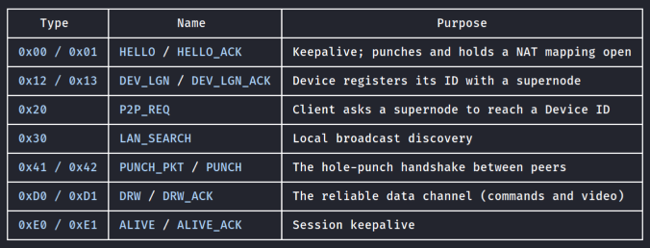
While there is a cipher used, it isn't good cryptography. The initiation key is hardcoded per brand, baked into the firmware next to the device-ID prefix. Anyone with the firmware can forge and read every packet. Sifting through packet captures and the firmware, we were able to identify a list of actions that the device performs when talking to the mobile app on a local network.
The hole-punch
From boot, the camera repeatedly tries to register with its supernodes (DEV_LGN) and continues to send out HELLO keepalives. Each outbound packet keeps a NAT pinhole open, so the supernode always knows the camera's current public IP and port. When you open the app, it sends a P2P_REQ naming the Device ID it wants. The supernode now knows both parties' pinholes and relays each address to the other. Both peers then fire UDP packets directly at each other simultaneously. From then on, it's a direct UDP path with the supernode dropped entirely from the data flow.
The local shortcut
The above assumes the phone and camera are on different networks. When they share a LAN, PPPP has a faster path that skips the supernodes. The app broadcasts a single LAN_SEARCH packet to the whole subnet on UDP port 32108, and any PPPP camera on the network answers.

The camera replies with a PUNCH_PKT sent from the random high port it has bound for the session (21848 here). That single packet hands the app two things at once: the camera's full Device ID in the payload, and the exact UDP port to talk to it on. On a shared LAN there's no NAT to traverse, so the punch collapses into a trivial two-packet exchange. No internet, no supernode, no cloud account. This was verified by physically unplugging the router's uplink; the app still discovered the camera and streamed live video over the LAN.
The Device ID is the only thing resembling a credential and the camera happily gives it to anyone who asks for it on the LAN.
Once a session exists, commands and video are transferred inside a DRW (type 0xD0) message, a stream layered over UDP. It multiplexes logical streams by channel: channel 0 carries small JSON control commands like {"pro":"check_user","cmd":100,…}, and channel 1 carries the H.264 video. PPPP is a clever answer to a real problem, but its design goal is connectivity, not security. A guessable Device ID is all that’s needed for connecting to a camera, the transport is obfuscated rather than encrypted, and LAN discovery is a single unauthenticated broadcast. Each is reasonable alone and dangerous in combination.
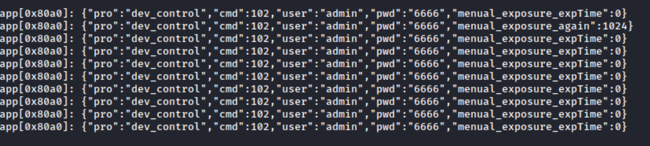
By decoding the packet captures it was possible to see the JSON commands being sent from the application to the camera. The following image shows exposure settings changed (initiated from the mobile app), and the username/password exposed with each JSON command. The username and password are hardcoded into the app and firmware and they are the same across every camera unit.
Mobile App Reverse Engineering
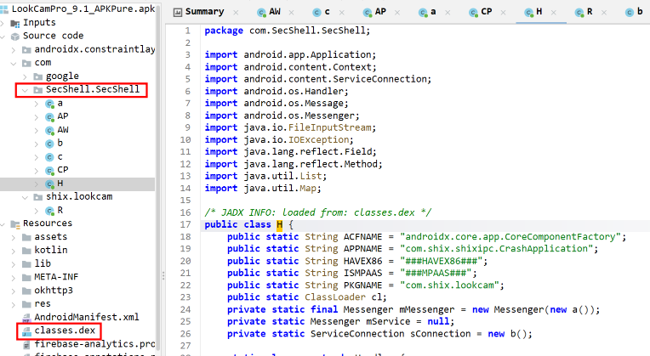
The camera is meant to be accessed via the mobile app so we will look at the Android app next. Upon loading the app APK in JADX there were no obvious app related classes decompiled. The core code was wrapped in a SecShell package. SecShell is an Android packer that keeps the real classes encrypted on disk and only decrypts them at runtime.
Beating the packer with Frida
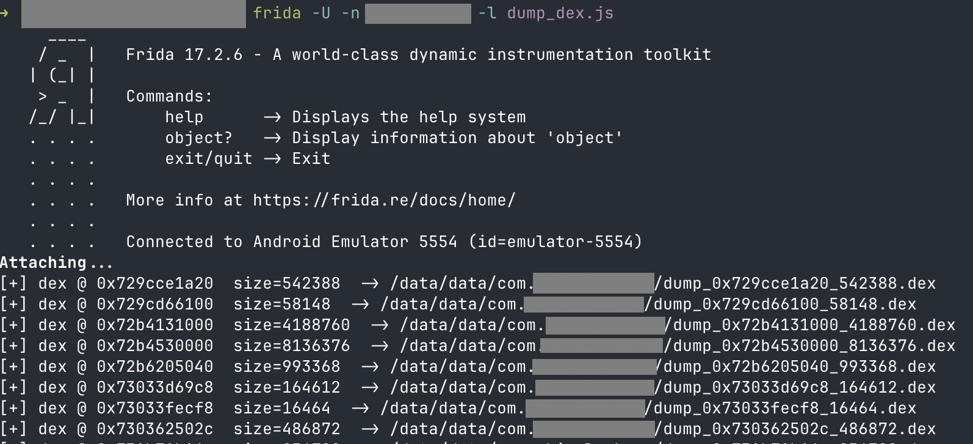
SecShell's weakness is that it must decrypt the classes into memory to run them. This means the application classes can be recovered from memory using Frida. This was achieved by performing the following:
- Launched the app on a rooted Android AVD (Magisk + Frida server).
- Ran a Frida script that scanned the heap for the DEX magic header once the classes had decrypted.
- Dumped the in-memory DEX to disk and transferred over the host for analysis.
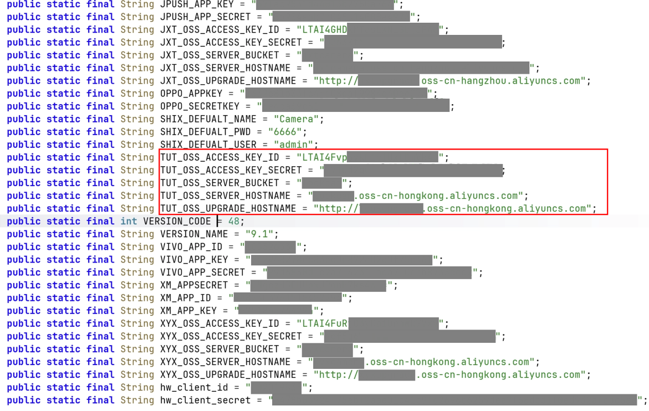
With the app decompiled cleanly, one class stood out immediately. The BuildConfig carried a long list of hardcoded strings: Alibaba OSS access keys, bucket names, update URLs and more; identical to the secrets we had already pulled from the firmware.
Hardcoded cloud keys for everyone’s footage
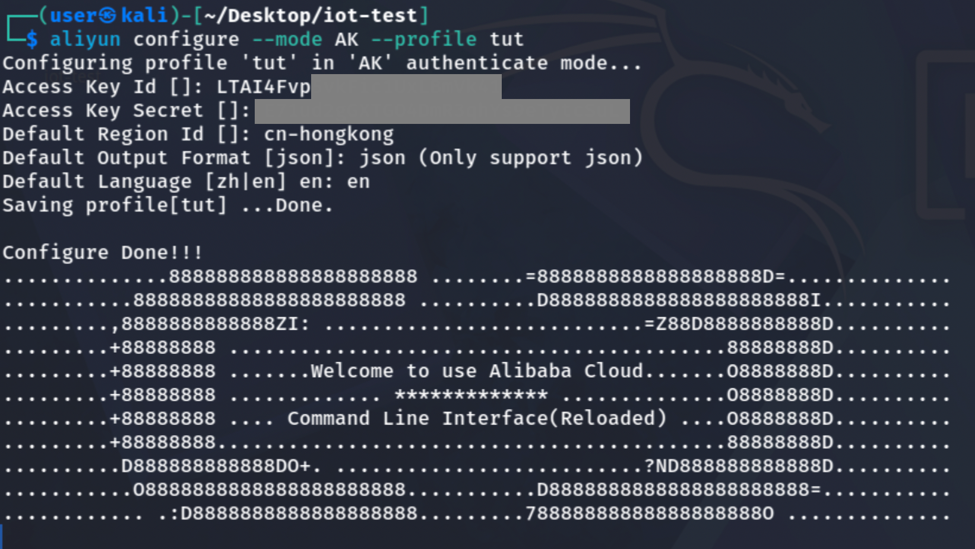
The app had three bucket key pairs hardcoded for three “brands” in a single APK. Only one pair was live, and fortunately it was the one matching the device that is the subject of this research project. Configuring it was as simple as setting up an AWS CLI profile but using the Alibaba equivalent aliyun-cli instead.
Running a simple “ls” on the discovered storage bucket name returned more than expected. Thousands of folders, each named after a camera ID, each with subfolders dated to the last few days, holding periodic snapshots from cameras.
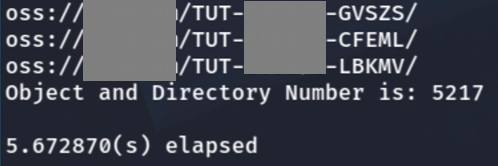

There was no separation and no access control at the bucket level whatsoever. Every camera in the “TUT” device family uploads to the same bucket, and anyone with the app is handed credentials to all of it. The only separation between users is a key-name prefix convention.
Things got worse in the app itself. Of the four ways to connect a camera, the “online connection” method lets you connect to any camera worldwide as long as you know its ID. There's a password required but that field is pre-filled with the hardcoded password of 6666, which is the default for every camera. Entering a device ID from the OSS bucket listing or simply guessing one would connect the app to a camera, allowing direct live viewing of its feed. What we saw was quite disturbing. These cameras, by their hidden nature, are often installed in bedrooms or hidden locations invading someone’s privacy. Beyond the live feed, the app exposes the camera's settings, including a Wi-Fi menu that, while it doesn't reveal the configured password, lists nearby access-point names.
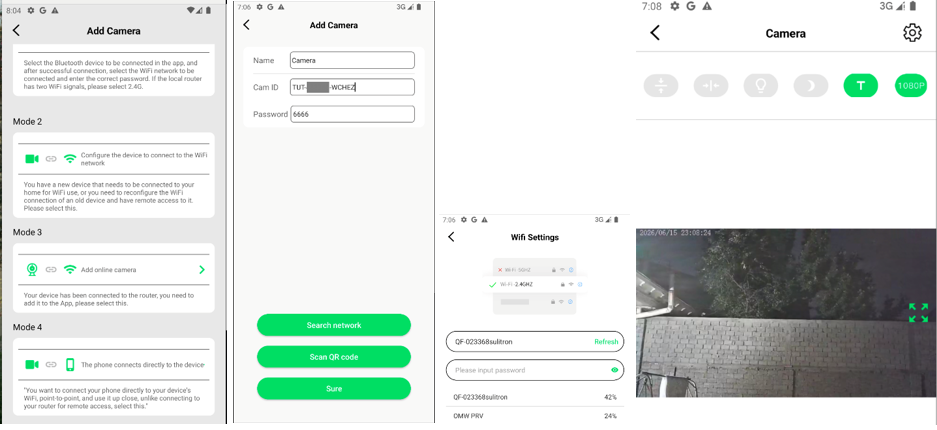
Combined with timestamps on the video feed, that's enough information to geolocate a device. Probably a quick task for someone like Rainbolt.
|
Research Question Answered: Recordings and live footage from other users and devices can be accessed. |
A shell hiding in plain sight
The flash dump from earlier held something more sinister than cloud keys. The camera's main application, /usrdata/app/target, a 5.8 MB ARM binary that runs as root and never stops. Everything the camera does from video, cloud upload to the app connection happens inside this one process. This binary was loaded into Ghidra and with a little (i.e. fairly sizeable) assistance from Claude Code we were able to identify a built-in backdoor to the device.
As we saw earlier, the mobile app controls the camera using a JSON format, sending commands and credentials with every action. The command names live in the pro field of those DRW JSON objects, dispatched inside the firmware by a long chain of strstr() comparisons against roughly forty-five handlers. After mapping them, one function named debug_device stood out. Following it in the decompiler showed that it reads a JSON field called shell, and if that field isn't empty, it hands the string straight to a helper that passes the input into popen():
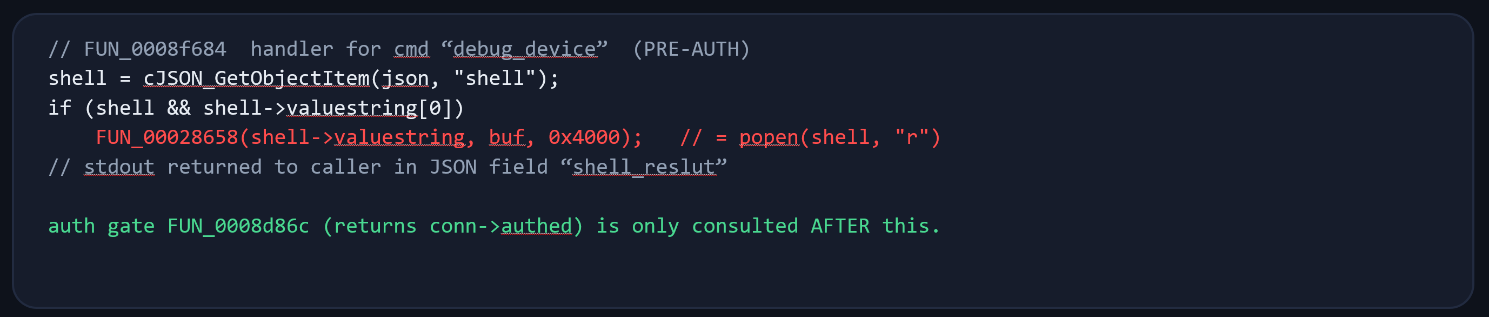
No sanitisation, no allow-list, no escaping. Whatever arrives in shell is passed to popen() and executed by the root process, and its output is returned to the caller. It is, verbatim, a remote shell built into the firmware. Two details turn this from bad to quite possibly very bad:
- It runs as root: app/target is launched by the init scripts with no privileges dropped, so the command inherits full control of the device as root including camera, microphone, filesystem, network.
- It's reachable before authentication. The firmware only consults its login gate after a handful of handlers have already run, and debug_device is one of those pre-auth handlers, alongside check_user, download_log, set_upgrade_for_url and del_push. The admin / 6666 login is entirely optional for this path. Even if authentication was a requirement, it would be using the default hardcoded credentials that are leaked in the network capture.
Putting it together
Everything above composes into a single self-contained attack that needs nothing but a foothold on the same network. Getting the correct message framing took a bit of trial and error but it resulted in a simple four-step process to execute code on the device:
- Broadcast a LAN_SEARCH and read the camera's Device ID and session port from its reply.
- Complete the hole-punch and start a session (or piggyback off of an existing session).
- Send one DRW packet on channel 0 carrying {"pro":"debug_device","cmd":0,"shell":"…"}.
- Read the command output back out of the shell_reslut field.
In the end we ended up with a couple different scripts, one of them can be used to search for devices using the PPPP protocol on the local network.
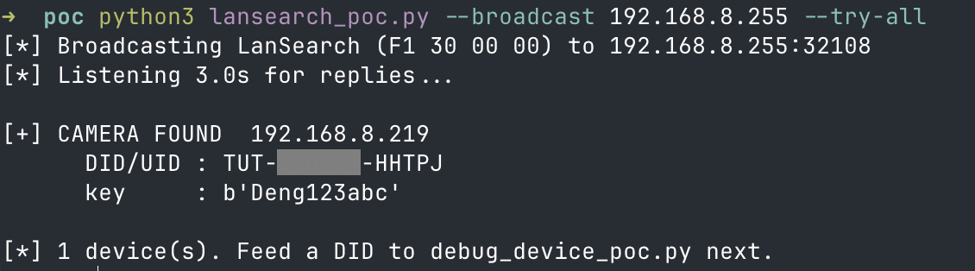
And finally, we achieved remote code execution on the device by only knowing it’s IP address. The following images show getting the current user level and kernel version from the camera and reading the /etc/passwd file which we have already seen during the firmware analysis phase, proving that our PoC worked.


Issue Highlights
Apart from the two main issues demonstrated so far (hardcoded secrets & remote code execution), there are a number of other problems with the tested device and application. Some of them are highlighted here.
- No ownership checks - Adding a camera in the app does not require an account and no ownership linking is performed. The camera doesn’t know who it belongs to.
- Open LAN discovery - Anyone on the local network can harvest device IDs and session ports with one unauthenticated broadcast.
- Default credentials - Auto-filled password in the app, with a four-character minimum password policy. No warnings or suggestions about changing the password in the app.
- No linking notification - Nothing alerts an owner when someone else connects to their camera using the app.
- Wi-Fi PSK exposure - The home Wi-Fi password is cached in plaintext locally and sent over a weak provisioning link.
Conclusion
Cheap IoT cameras in 2026
We started with one question: Are cheap cameras posing a cybersecurity issue in 2026? The answer is yes. Some of them are very insecure. From uploading to a shared Alibaba bucket in China, without user consent, to storing secrets hardcoded in the source code, to the lack of ownership validation and more, the target device of this research has shown that buying unbranded cheap IoT products online still comes with risks.
The deeper point isn't about one device. It's about the white-label supply chain underneath: one insecure design, cloned across multiple brand names, sold to people who have no way of knowing that the £30 charger on their nightstand is quietly the least private device in the house.
References
1. An overview of the PPPP Protocol for IoT Cameras
2. Spying on the Spy: Security Analysis of Hidden Cameras