During Red Team engagements, Data Protection API (DPAPI) often arises when recovering browser material, extracting saved credentials, or acquiring and decrypting user Master Keys. While revisiting DPAPI internals, another artefact caught our attention: CREDHIST.
When a user changes their password, old DPAPI blobs still need to be decrypted, so Windows maintains a password history chain that allows previous DPAPI password material to be recovered.
After some investigation into CREDHIST, we have updated DPAPISnoop to support extracting CREDHIST entries into offline-crackable hash lines, alongside its existing Master Key hash extraction functionality. That change opened an interesting path where previously recovered passwords could now be used to identify a user’s password patterns over time.
GitHub - DPAPIsnoop: https://github.com/nettitude/DPAPIsnoop
Background
DPAPI has been covered extensively over the years by Passcape, Mimikatz, SpecterOps, DPAPIck, and many others. The usual DPAPI target is the user's Master Key, as recovering it allows decryption of the user's DPAPI-protected blobs. CREDHIST has also been previously documented in “Recovering Windows Secrets and EFS Certificates Offline” (2010). DPAPIck implemented offline recovery, Mimikatz can parse it, Dissect can process it, and commercial tooling has supported it for many years.
The gap explored here was whether, given access to a user's CREDHIST entries, hashes could be extracted for offline cracking and the rest of the chain walked?
Looking at the file
A CREDHIST file sits under the user's DPAPI protection directory, %APPDATA%\Microsoft\Protect.
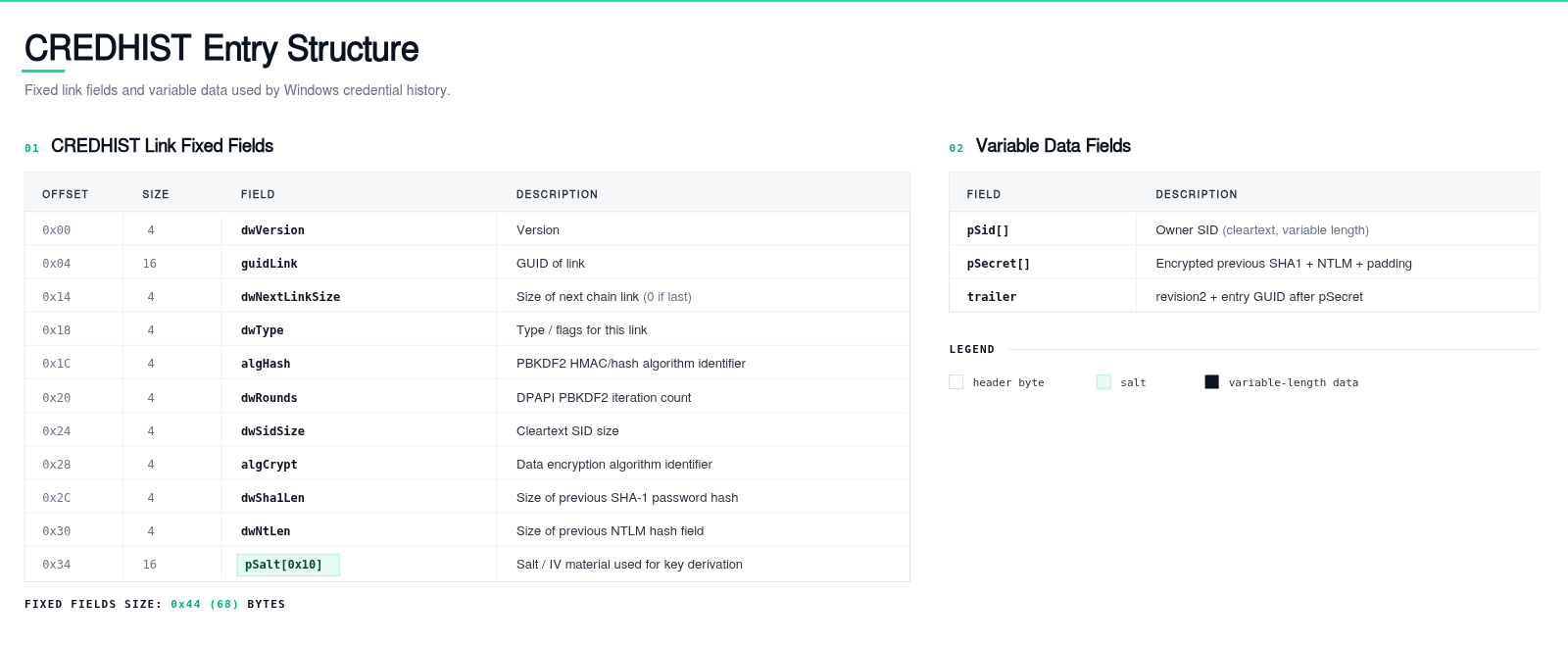
The file’s structure has been previously documented and can be seen below.
(Click to zoom)
Of interest are the following fields:
- The user's SID (Security Identifier)
- The hash algorithm
- The encryption algorithm
- The PBKDF2 (Password-Based Key Derivation Function 2) round count
- A 16-byte IV (Initialisation Vector)
- The encrypted historical material
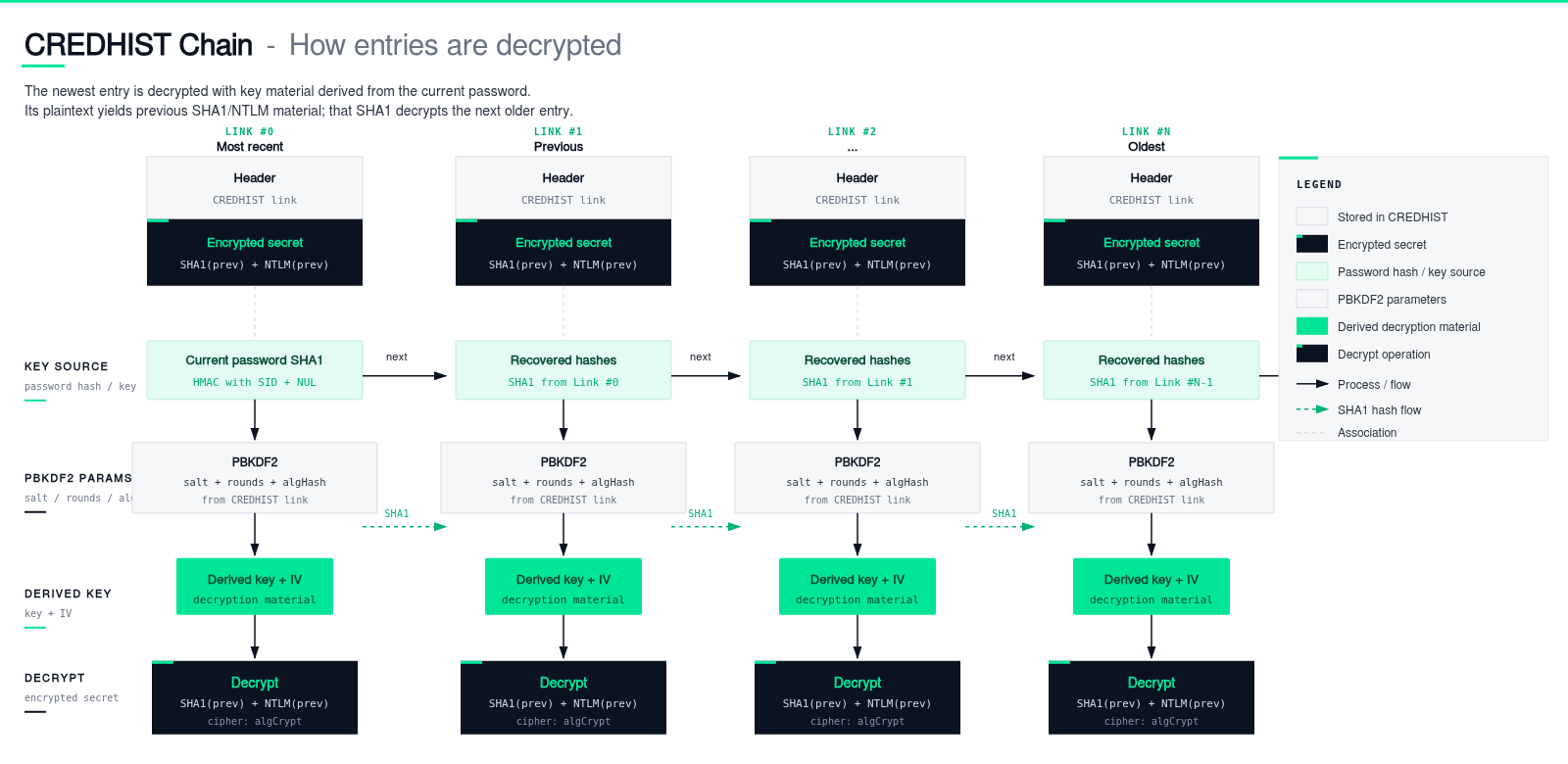
Credential history entries are stored sequentially as a chained series of encrypted hashes. Each entry is encrypted with key material derived from an older password, while the newest entry uses material derived from the user's current password.
(Click to zoom)
Therefore, cracking the newest CREDHIST entry recovers the user’s current password. Additionally, CREDHIST entries in the middle of the chain can be extracted and attacked directly as standalone hashes. In that case, a successful crack recovers the password material that protects that specific entry, while the decrypted entry reveals the next older password’s SHA1/NTLM material.
Why this is useful
In most modern Windows environments, CREDHIST entries typically use SHA-512 PBKDF2 with AES-256 and 8,000 rounds, which aligns with the DPAPI Master Key protection. On older CREDHIST entries, however, the cracking cost can be substantially lower. Legacy 3DES + HMAC-SHA1 entries use SHA-1 based PBKDF2, which is significantly faster to attack than SHA-512.
The practical difference between attacking a Master Key hash and a CREDHIST hash is that cracking a CREDHIST entry provides historical SHA1 and NTLM material directly.
Furthermore, additional value comes from password intelligence, where historical passwords often reveal predictable user patterns.
Ask yourself: how many times have you found notes or files containing old passwords? Now consider how those could be used to unlock previous entries and gain insight into a user's password habits.
Tooling
To facilitate the retrieval of hashes, the open-source C# tool DPAPISnoop was extended to extract CREDHIST entries alongside DPAPI Master Key hashes. When provided with the current password or its SHA1 value, the tool can also decrypt the CREDHIST chain directly.
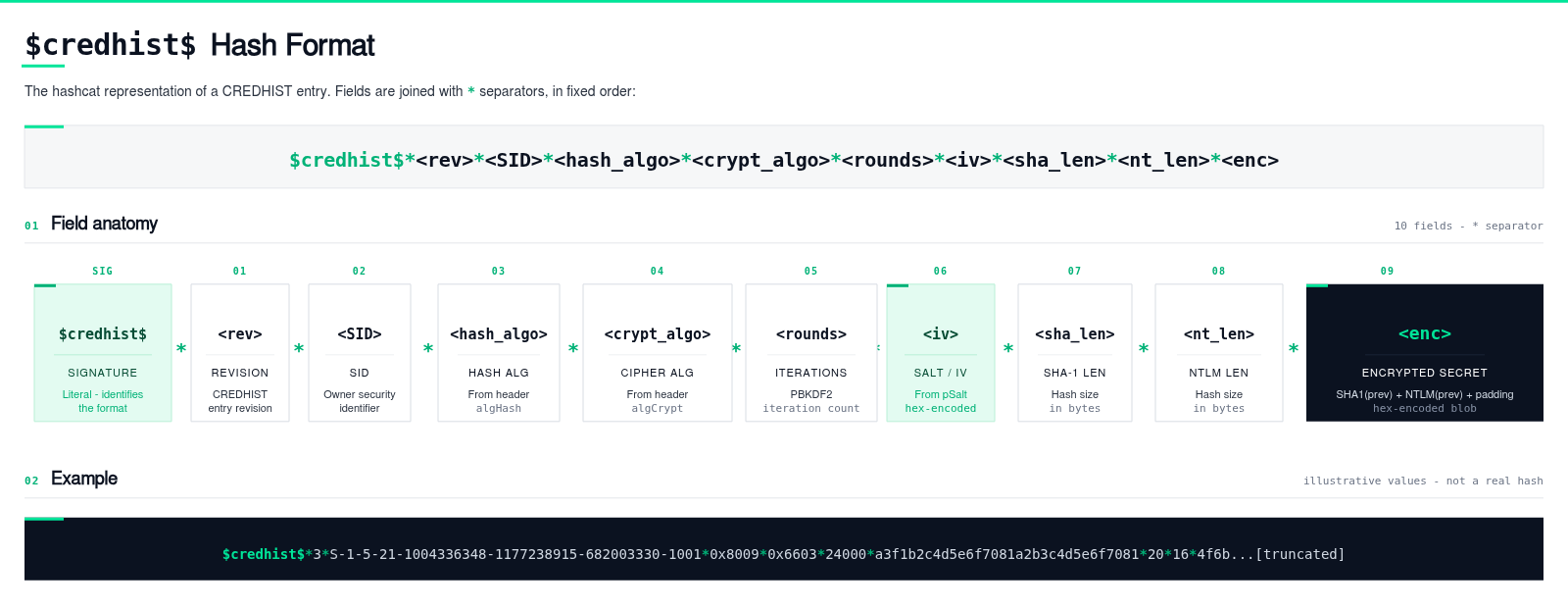
For each extracted CREDHIST entry, the tool outputs an offline-crackable hash – the structure of which can be seen below, starting with the identifier $credhist$.
(Click to zoom)
Additionally, two new Hashcat modes were implemented:
- 15920 - DPAPI CREDHIST entry using 3DES + HMAC-SHA1
- 15930 - DPAPI CREDHIST entry using AES-256 + SHA-512
Their source code can be found on our GitHub. Pull requests to upstream Hashcat are the next step.
In practice
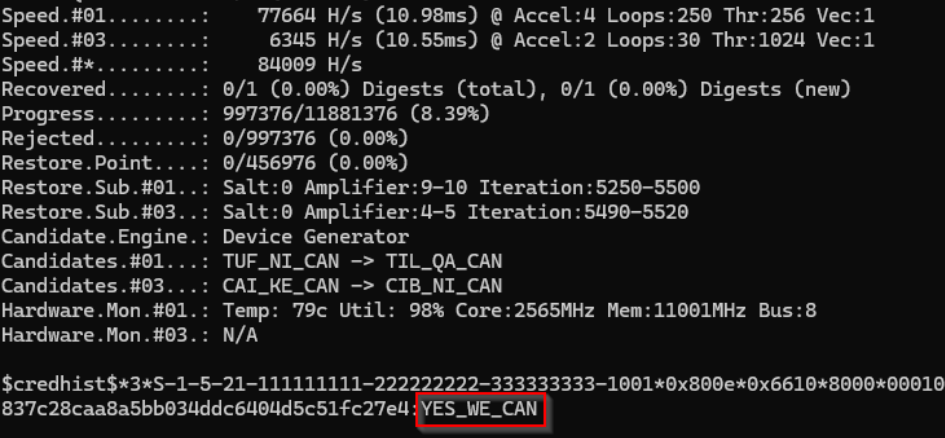
Running the tool as a non-administrator user will only fetch the current user’s Master Key hash and CREDHIST hashes, as can be seen below:

We can then take the above hashes and feed them into Hashcat using the newly developed modules (15920 and 15930):
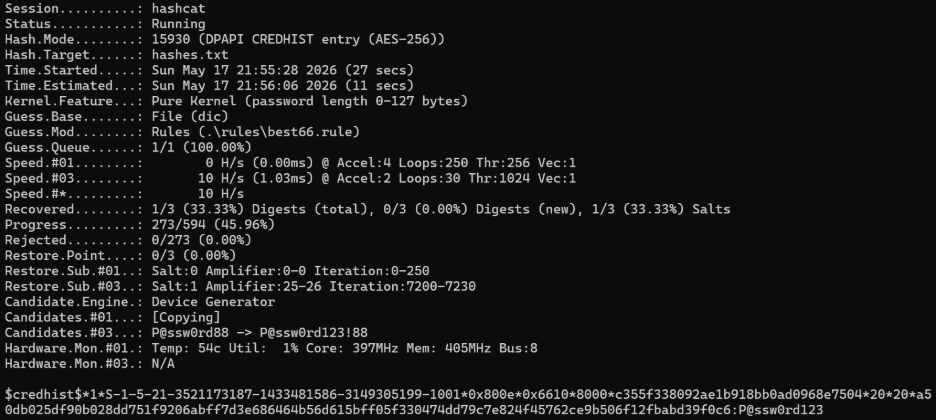
After Hashcat recovers a password, it can then be passed back to DPAPISnoop.
The tool tries the password against every entry from newest to oldest and walks from the first entry it can decrypt:

Defensive Considerations
This behaviour is not a Windows vulnerability. It is a consequence of DPAPI’s password history design and is similar to other existing DPAPI tradecraft. Domain backup keys, Master Key files, browser state keys and Credential Manager blobs are all expected parts of Windows. They become offensive opportunities when an attacker can collect and process them.
The following are areas of interest to monitor:
- Unusual reads of %APPDATA%\Microsoft\Protect\CREDHIST
- Bulk reads of %APPDATA%\Microsoft\Protect\<SID>\
- Access to user DPAPI directories over SMB
- Access to user DPAPI protection directories over SMB or administrative shares
SigmaHQ already has a relevant rule, Access To Windows Credential History File By Uncommon Applications, which detects access to paths ending in \Microsoft\Protect\CREDHIST, and a similar approach can also be found from Elastic.
The detection signal needs to be narrower than "DPAPI was used", given that DPAPI is in constant use. The better signal is “abnormal” access to the DPAPI files.
References
- Elie Burzstein and Jean Michel Picod, "Recovering Windows Secrets and EFS Certificates Offline."
- Microsoft, “CryptProtectData function.”
- Microsoft, “CNG DPAPI.”
- Microsoft, “DPAPI Backup Keys on Active Directory Domain Controllers”
- NAI Labs, “Windows Data Protection.”
- SpecterOps, “Offensive Encrypted Data Storage: DPAPI Edition.”
- SpecterOps, “Operational Guidance for Offensive User DPAPI Abuse.”
- SpecterOps, “DPAPI Backup Key Compromise Pt. 1: Some Forests Must Burn.”
- Passcape, “DPAPI CREDHIST.”
- Passcape, “DPAPI blob analysis.”
- Passcape, “DPAPI Master Key analysis.”
- NirSoft, “CredHistView.”
- Benjamin Delpy, “Mimikatz Wiki: module ~ dpapi.”
- Fox-IT, “Dissect CREDHIST parser.”
- DPAPIck3, PyPI project page
- GhostPack, “SharpDPAPI.”
- Hashcat, “Example Hashes.”
- SigmaHQ, “Access To Windows Credential History File By Uncommon Applications.”
- Microsoft, "DPAPI MasterKey backup failures when RWDC isn't available."
- Sygnia, "The Downfall of DPAPI's Top Secret Weapon."